Write Facebook & Instagram ads from a product page
Every launch needs ad copy, and every ad starts with copying the product name, price and features into a chat. Page2Prompt's Product mode reads them from the shop page for you and sends a prompt for three ad variations, each on a different angle.
The situation
A WooCommerce store owner needs ads for a new ceramic coffee set.
How to do it with Page2Prompt
- Open the product page and click Product
- Pick Facebook & Instagram ads
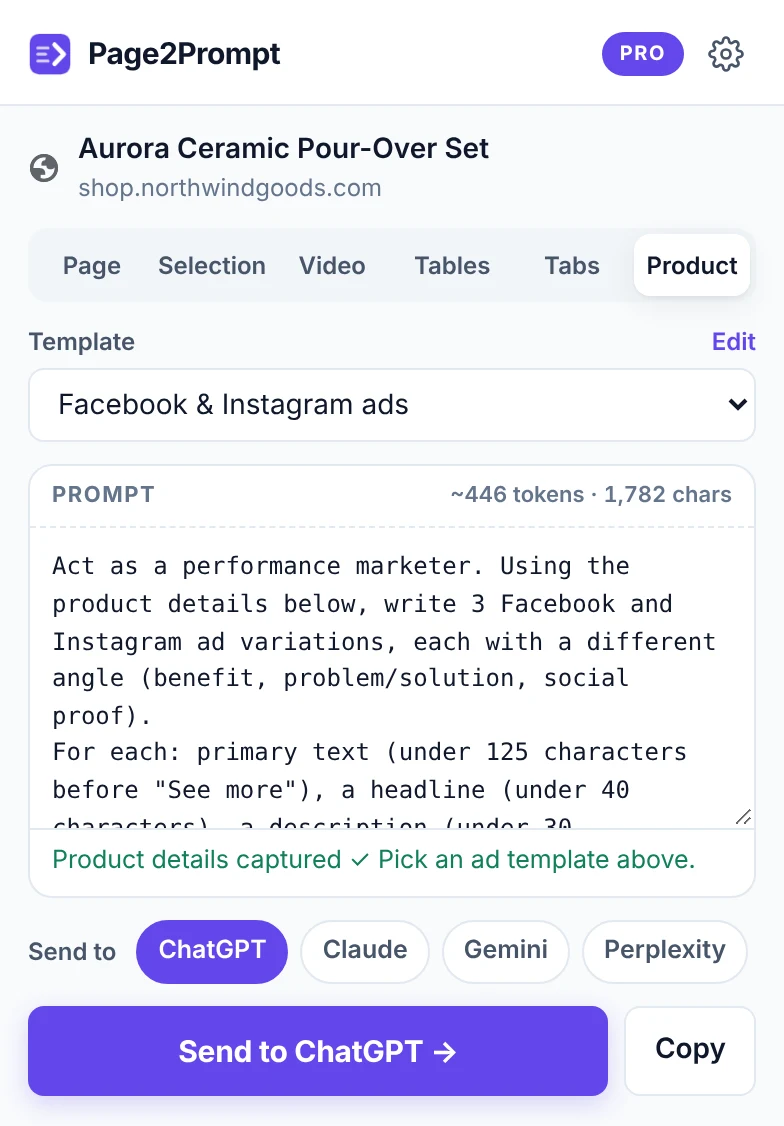
What you get
You get: Name, price, features, specs and real customer reviews are read for you. You get 3 ad versions (benefit, problem/solution, social proof) at the right lengths, plus audience ideas.
Variation 1 – Benefit
Primary text: Slow mornings, better coffee. The Aurora pour-over set brews a clean, full-flavour cup in 4 minutes.
Headline: Café coffee at home
CTA: Shop now
Variation 2 – Problem/solution
Primary text: Bitter coffee from your machine? Hand-poured brewing gives you control over every cup.
Headline: Fix bitter coffee for good
Variation 3 – Social proof
Primary text: Rated 4.8 by 1,200+ coffee lovers. See why the Aurora set is their morning ritual.
Headline: 1,200 five-star mornings
Example for illustration. Your AI's answer depends on the page and the AI you use.
The prompt Page2Prompt sends
This is the exact template text. Page2Prompt adds the page title, link and clean content where it says so. Pro users can edit it to match their style.
Facebook & Instagram ads (Pro)
Act as a performance marketer. Using the product details below, write 3 Facebook and Instagram ad variations, each with a different angle (benefit, problem/solution, social proof).
For each: primary text (under 125 characters before "See more"), a headline (under 40 characters), a description (under 30 characters) and a call-to-action button.
Then suggest 3 audience targeting ideas. Only use claims supported by the details.

---

[the page content Page2Prompt captured goes here]
How to do it without the extension
- Copy the product name, price, main features and a few review quotes from the page.
- Paste them into ChatGPT with the prompt above.
- Check every price and claim before adding the ads to Ads Manager.
It works, but it takes several copy-and-paste steps every time. Use the prompt above. Page2Prompt does the capture, the clean-up and the pasting in one click.
Why use Page2Prompt for this
- Name, brand, price, features, specs and rating are read from the shop page for you, so the copy is built on real product facts.
- The prompt is written and tested for this exact job, so you get a consistent result every time instead of retyping instructions.
- It works with ChatGPT, Claude, Gemini and Perplexity, using the free or paid account you already have.
- Your content goes straight from your browser to the AI you pick and never through WindCodex servers.
Tips
- Works on most online stores, including Shopify and WooCommerce shops.
- Each variation includes primary text, a headline, a description and a call to action.
- Check prices and claims in Ads Manager before anything goes live.
Questions
Is Product mode free?
Product mode is part of Pro.
Can I use it on competitors' product pages?
Yes, for research. Write your own ads for your own products; don't copy another brand's claims.
Does it work with Claude and Gemini?
Yes. Page2Prompt sends to ChatGPT, Claude, Gemini and Perplexity. Pick the AI in the popup; the prompt is the same.
Does my content go through WindCodex?
No. Page2Prompt reads the page in your browser and sends it straight to the AI site you choose. It never passes through our servers.
For Marketers & sellers
Marketers and store owners use it to turn real product and page details into copy for every channel.
Related use cases
Try it on the page you're reading.
Free to install, no account needed. This one is part of Pro.