Summarize a long article in seconds
Long articles hide the one paragraph you need under ads, pop-ups and related links. Copying the text into ChatGPT drags all of that along, and you still have to write the instructions. Page2Prompt captures only the article and sends it with a tested summary prompt, so the answer arrives before your coffee does.
The situation
A 3,000-word article on heat pumps vs gas boilers, and five minutes before a meeting.
How to do it with Page2Prompt
- Open the article and click the Page2Prompt icon
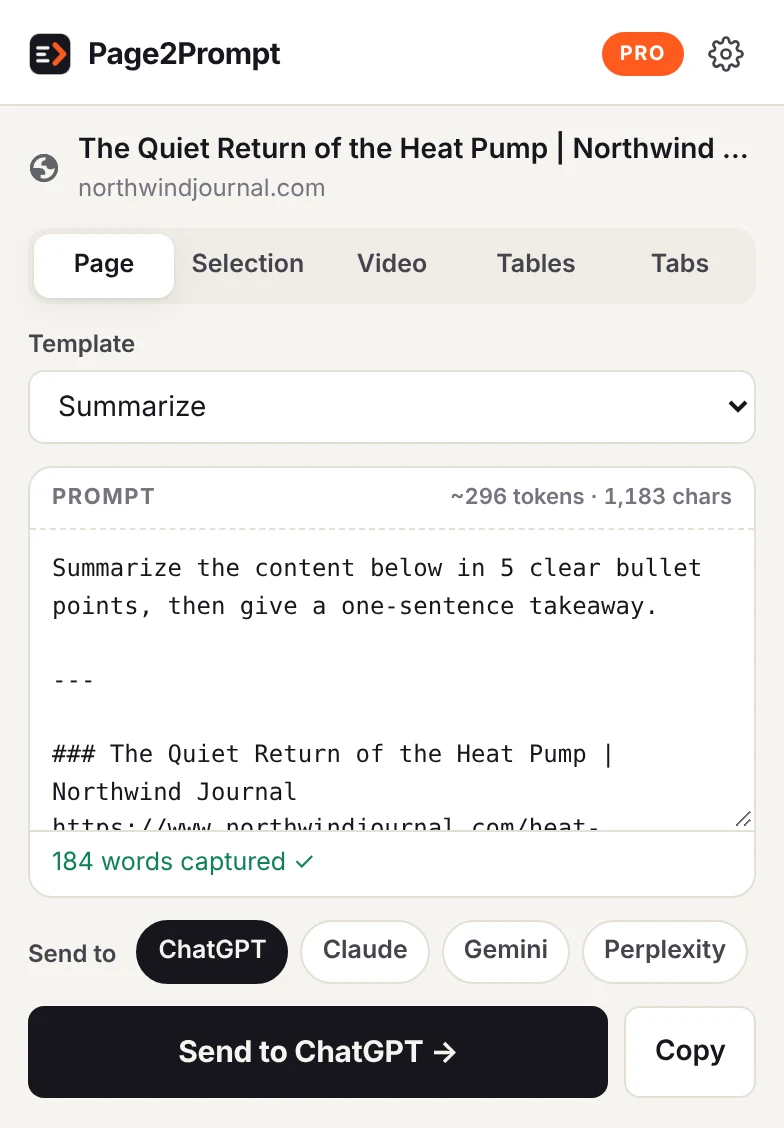
- Pick Summarize and click Send
What you get
You get: ChatGPT opens with only the clean article (no menus, ads or cookie banners) and asks for 5 bullet points plus a one-line takeaway.
- Heat pumps now outsell gas boilers in several markets, mainly because running costs have fallen.
- A modern air-source heat pump delivers about 3 units of heat for each unit of electricity.
- Newer models keep working in temperatures well below freezing.
- Upfront cost is still the main barrier, but grants cover a large share in many regions.
- Installers report waiting lists as demand grows.
Takeaway: heat pumps have gone from niche to mainstream because they now cost less to run than gas.
Example for illustration. Your AI's answer depends on the page and the AI you use.
The prompt Page2Prompt sends
This is the exact template text. Page2Prompt adds the page title, link and clean content where it says so. Pro users can edit it to match their style.
Summarize (Free)
Summarize the content below in 5 clear bullet points, then give a one-sentence takeaway.

---

[the page content Page2Prompt captured goes here]
How to do it without the extension
- Open the article and select only the article text (Ctrl+A also grabs menus, ads and comments).
- Copy it and open ChatGPT, Claude or Gemini.
- Paste the prompt above, then paste the article under the line.
- For long pages, check the AI didn't cut the text off, and send it in parts if it did.
It works, but it takes several copy-and-paste steps every time. Use the prompt above. Page2Prompt does the capture, the clean-up and the pasting in one click.
Why use Page2Prompt for this
- It captures only the main content: no menus, ads, cookie banners or comments, so the AI focuses on what matters and you use fewer tokens.
- The prompt is written and tested for this exact job, so you get a consistent result every time instead of retyping instructions.
- It works with ChatGPT, Claude, Gemini and Perplexity, using the free or paid account you already have.
- Your content goes straight from your browser to the AI you pick and never through WindCodex servers.
Tips
- Works on news sites, blogs, documentation and reports, in any language.
- Turn on Settings → Reply in to get the summary in Hindi, Spanish or another language.
- Need the facts and next steps instead? Pick Key facts & actions (Pro).
Questions
Does it work on paywalled articles?
It reads what your browser can show. If you can read the article, Page2Prompt can capture it; it never bypasses a paywall.
Which AI gives the best summaries?
All of them do well with a clean prompt. ChatGPT, Claude and Gemini are the most popular choices; you can switch with one click in the popup.
Does it work with Claude and Gemini?
Yes. Page2Prompt sends to ChatGPT, Claude, Gemini and Perplexity. Pick the AI in the popup; the prompt is the same.
Does my content go through WindCodex?
No. Page2Prompt reads the page in your browser and sends it straight to the AI site you choose. It never passes through our servers.
For Students & researchers · Busy professionals · Writers & SEO
Students and researchers use it to understand long or difficult material faster, in their own language. Busy professionals use it to handle emails, documents and decisions in a fraction of the time. Writers and SEO teams use it to go from research to a first draft without the copy-and-paste routine.
Related use cases
Try it on the page you're reading.
Free to install, no account needed. This one is free.